GBA Basics
| Type | Quiz 4 Material |
|---|
Notes
GBA - Game Boy Advance emulator
GBA fundamental diagrams
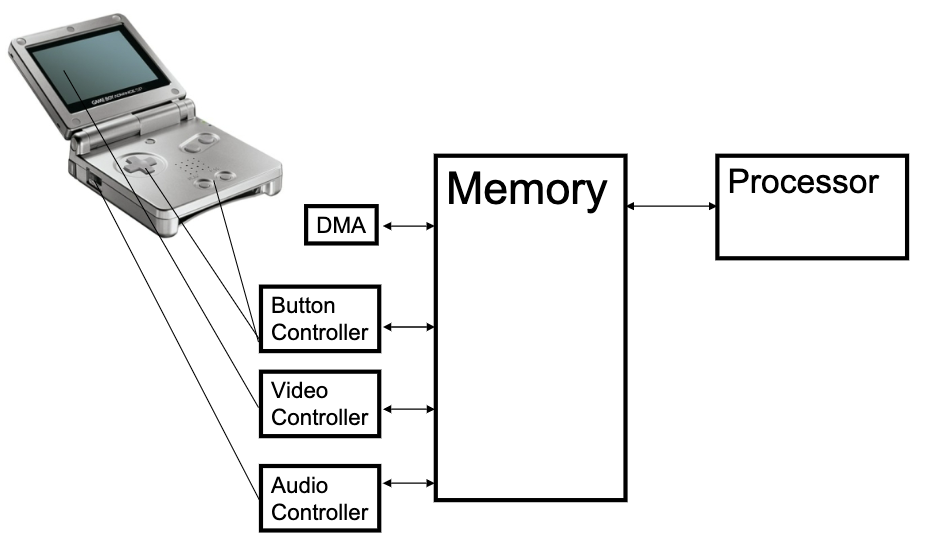
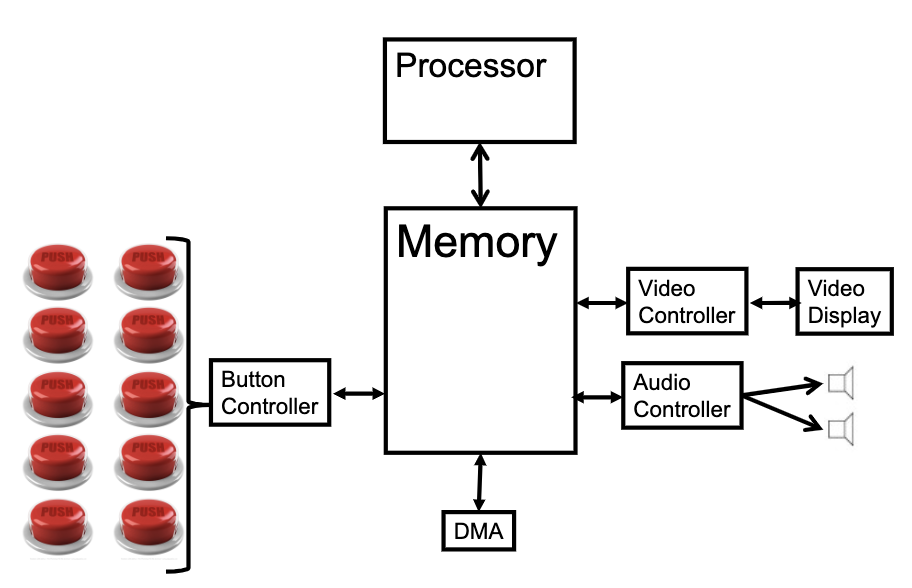
GBA graphics
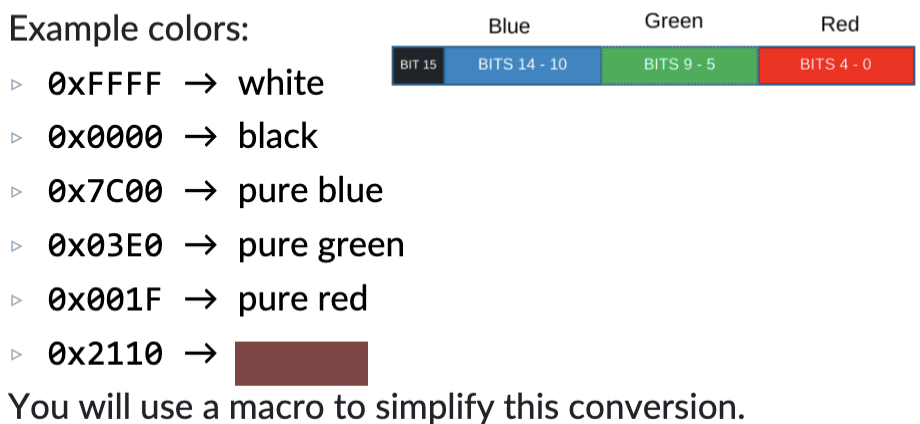
Pixel: 16 bit value
Each color is allotted 5 bits, intensity from 0 - 31
Bit 15 is unused

GBA colors
Video Buffer
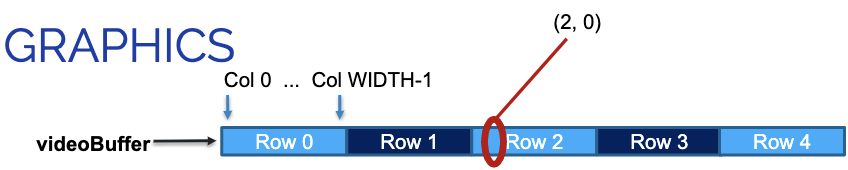
Video buffer is a one dimensional array that tells GBA hardware the value to display on the screen
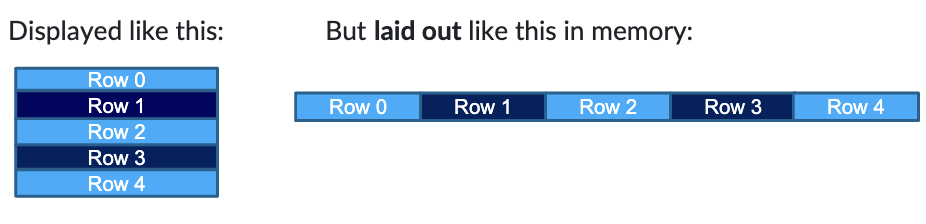
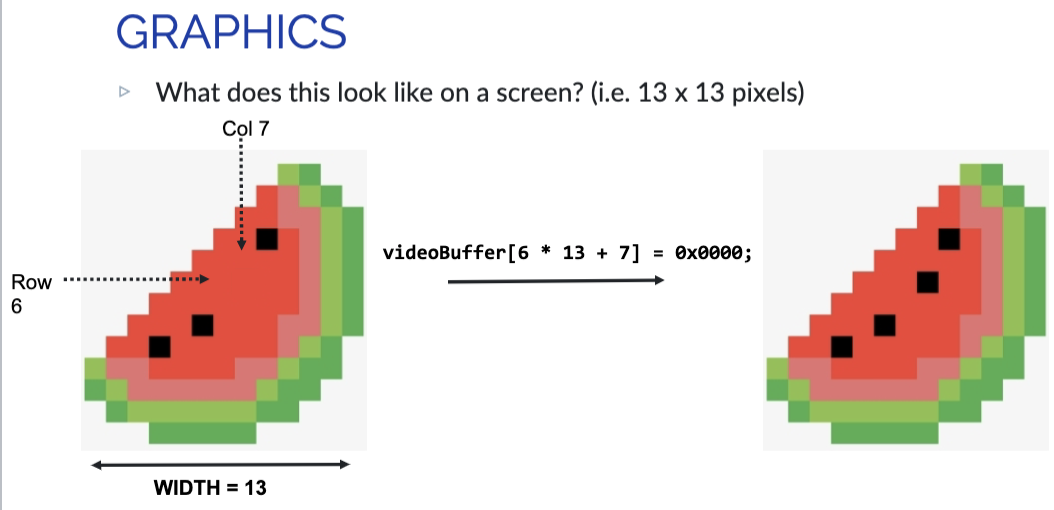
Indexing into a specific (row, col) coordinate
Offset Calculation:
unit16_t videobuffer[];
videoBuffer(row, col) = videobuffer + (row * WIDTH + col)
WIDTH is the length of each row(the width of the screen)
Can use Macro to simplify this calculation
Example
GBA Draw Cycle
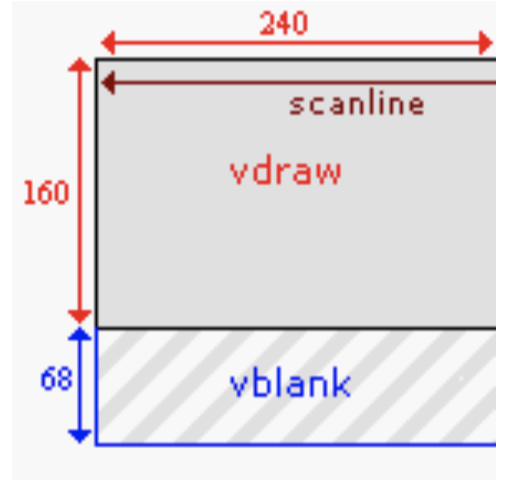
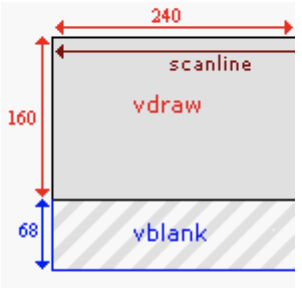
GBA alternates between: VDraw and VBlank
VDraw:
- GBA copies one row of pixels at a time from the video buffer to the screen
- VDraw is not instantaneous. halfway through VDraw, only half the scanlines have been drawn
VBlank: Nothing Happens
Tearing
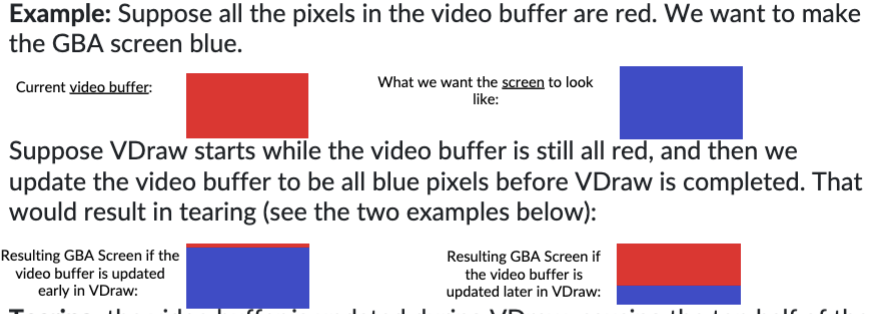
the video buffer is updated during VDraw, causing the top half of the screen to show the old image and the bottom half to show the new image.
If we update the video buffer during VBlank, no tearing will happen, because the screen is not updated during VBlank.
Example
Synchronizing Drawing and Logic
The GBA exposes the scanline counter as a memory- mapped device register; it can be read using the macro defined below.
The scanline counter indicates the current row of pixels being drawn at the screen (screen height: 160)
- 0 ≤ SCANLINECOUNTER ≤ 159: VDraw
- 160 ≤ SCANLINECOUNTER ≤ 227: VBlank
#define SCANLINECOUNTER *(volatile unsigned short *)0x4000006
Implementing waitForVBlank
SCANLINECOUNTER > 160 —> thee GBA is in VBlank
Two issues:
- What if scanline is past 160, but almost at the end of VBlank? No enough time to change the video buffer before VDraw
- What if app logic runs too quickly and we draw two frames during the same VBlank?
Use waitForVBlank()
- wait for the next full VBlank period
- SCANLINECOUNTEER == 160 exactly
- Wait until scanline is past VBlank and then comes back to VBlank
However, VBlank cannot fully eliminate tearing — Only about 1600 pixels updates can be drawn during a single VBlank phase. Filling the entire screen (38400 pixels) takes several cycles, guaranteeing tearing.
Direct Memory Access(DMA)

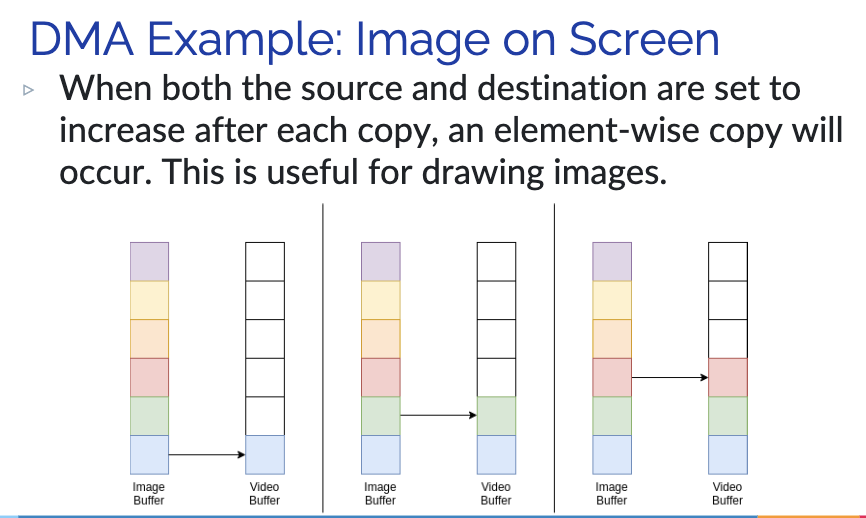
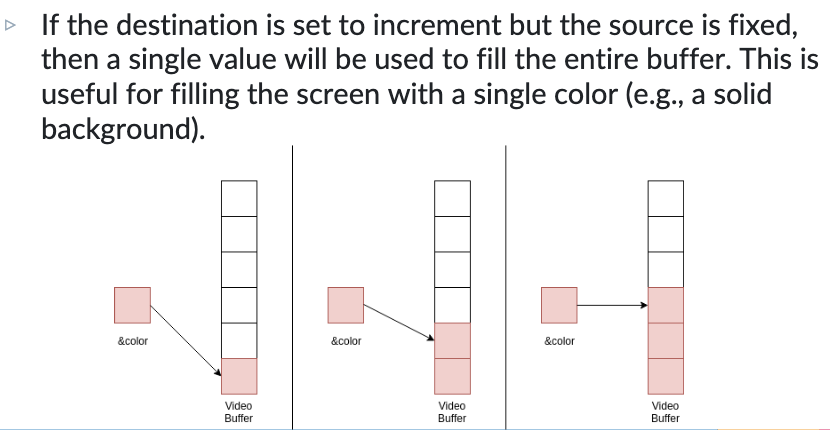
DMA optimizes large array copy, can drawing without tearing(drawing is array copy)
DMA is not connected to the CPU. However, when DMA operates, it takes cycles from the CPU and writes to specific memory locations, then returns control to the CPU once finished.
There are 12 DMA registers and 4 channels. Each channel has a source, destination, and control register.
Channel 3 - General Purpose Register
DMA Source and Destination Registers
Both Source and Destination Registers contain short pointers.
Destination Register:
- Given a pointer to videoBuffer, potentially with some offset added
Source Register:
- Source register is typically given a pointer to an array of pixel values, or a constant color
DMA Control Registers

The control register sets:
- Whether DMA is currently enabled(En)
- How many elements to copy over(N)
- How to iterate through the destination(DA)
- How to iterate through the source(SA)
- Whether to copy halfwords(16-bits) or words(32-bits)(CS)
Iteratee through destination/source
- Increment the address with each element(low —> high addresses)
- Decrement the address with each element(high —> low addresses)
- Fix the address with each element
DMA example: Image to Screen
DMA example: Color on Screen
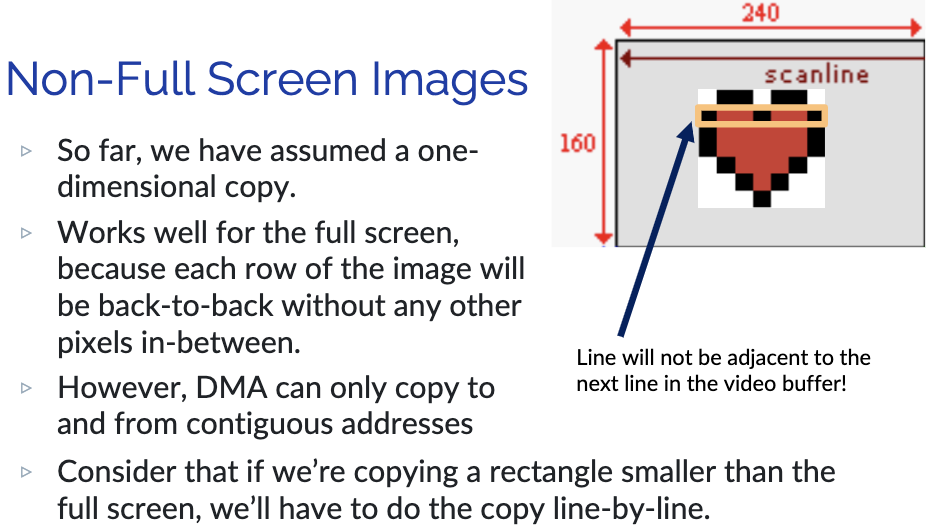
DMA: Non-full Screen Images
Use DMA in code
DMA_Controller struct with the 3 registers:
typedef struct
{
const volatile void *src;
const volatile void *dst;
u32. cnt;
}
DMA[3] is used to access channel 3
#define DMA ((volatile DMA_CONTROLLER *) 0x040000B0)
GBA Program as a State Machine
- State 1: Start screen
- Draws an image. Transition to State 2 when "start" is pressed
- State 2: Core application
- Contains the actual application - draws any necessary icons or images and transitions to State 3 if times expires
- State 3: The "game over" or "exit" screen
- Draws an image; transitions to State 1 when "start" is pressed
Buttons

In this register, bits 15–10 are unused, and each button is assigned a
single bit.
The key states are low-active, meaning their bit is cleared when the button is pressed and set when it is released.
Change states on button presses
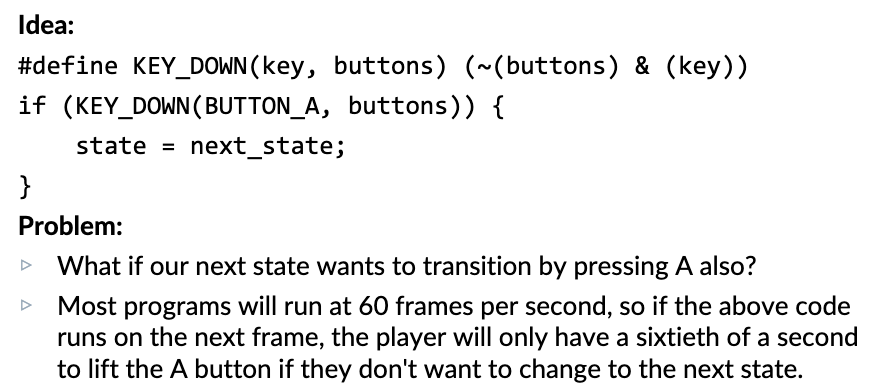
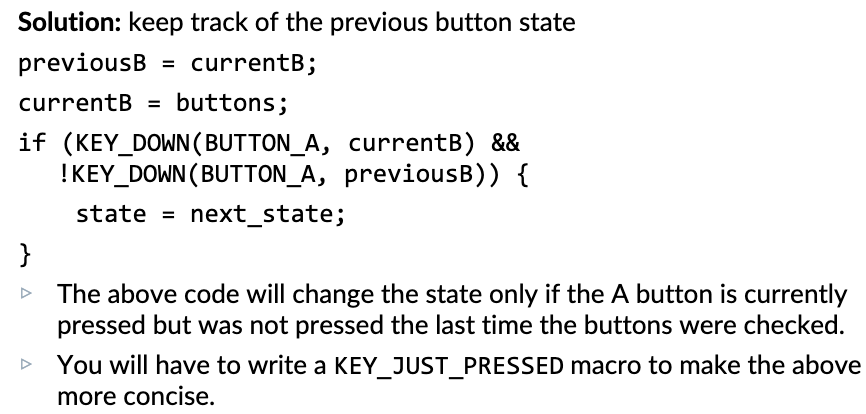
Edge-Triggered State Changes
Questions & Answers
- What is the draw cycle? What does
waitForVBlankdo?
- What is the
videoBufferis and how is it represented in C?
- How are colors represented in the
videoBuffer?
- How do you index the
videoBuffer?- Write a line of code that sets the pixel in row 15 and column 12 (indexed from 0) to yellow
- Understand what the videoBuffer is and how it's represented in C
- It is a one-dimensional array of pixels used to generate graphics. Each pixel is represented by a 16 bit value.
- Understand how to index the videoBuffer
- Write a line of code that sets the pixel in row 15 and column 12 (indexed from 0) to black
- videoBuffer[15*WIDTH + 12] = 0x0000
- Write a line of code that sets the pixel in row 15 and column 12 (indexed from 0) to black
GBA Basics
- What is the draw cycle? What does waitForVBlank do?
- Draw Cycle
- The GBA alternates between two phases: VDraw and VBlank.
- VDraw : GBA copies one row of pixels at a time from the video
- Draw Cycle
buffer to the screen.
- VDraw is not instantaneous : halfway through VDraw, only half
the scanlines have been drawn.
- VBlank : nothing happens.
- waitForVBlank
- If we update the video buffer during VBlank, no tearing will happen,
because the screen is not updated during VBlank

- Understand what the videoBuffer is and how it's represented in C

- How are colors represented in the videoBuffer?

- Understand how to index the videoBuffer
- Write a line of code that sets the pixel in row 15 and column 12 (indexed from 0) to yellow
- videoBuffer[15 * 240 + 12] = #
